Macguffin: A Crisp and Versatile Font for Creative Projects
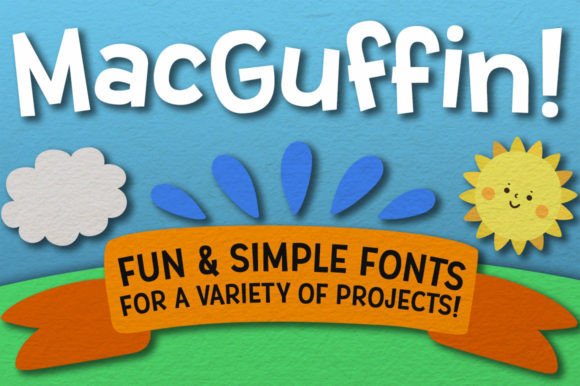
If you're looking for a font that blends simplicity with character, Macguffin might just be the perfect fit. Designed to be both clean and engaging, this typeface brings a modern edge to any project without overwhelming the reader. Whether you're working on branding, crafting content, or designing logos and signs, Macguffin delivers clarity and charm in equal measure.
What Makes Macguffin Stand Out?
At first glance, Macguffin appears minimalistic — but don’t be fooled by its simplicity. The font is crafted with precision, offering a sharp and smooth appearance that feels professional yet approachable. Its consistent stroke weight and open letterforms make it highly legible across various mediums, from print to digital screens.
The package includes four distinct versions of Macguffin: the standard Macguffin, Macguffin Condensed, Macguffin Wide, and the playful Macguffin Jumble. Each variant serves different design needs while maintaining the core aesthetic of the font family. With over 500 characters per font, including extended Latin language support, Macguffin ensures your text looks polished and professional no matter where it’s used.
Why Choose Macguffin for Your Projects?
- Crisp and Clear: Ideal for headlines, body text, signage, and branding materials.
- Multi-Format Support: Comes in both OTF and TTF file formats for compatibility across software platforms.
- PUA Encoding: All fonts are fully PUA-encoded, making it easy to access special glyphs without complicated tools.
- Language-Friendly: Includes accented characters for languages like Spanish, French, Italian, and more.
- Time-Saving Features: Macguffin Jumble offers pre-jumbled letters and 30 double-letter ligatures, adding visual interest effortlessly.
Real-World Applications of Macguffin
Fonts play a subtle but powerful role in communication, and Macguffin is versatile enough to adapt to many use cases. Here are some practical examples of how it can elevate your work:
For Entrepreneurs and Business Owners
Branding is all about making an impression, and the right font can help establish tone and identity. Macguffin works well for business logos, especially if you're aiming for something modern and memorable. Its clean lines give it a professional feel, while the quirky angles in Macguffin Jumble can add a touch of personality to promotional materials or packaging designs.
Consider using Macguffin for your website headers or social media banners. It’s not too bold, not too soft — just right for creating a balanced brand presence.
For Designers and Creators
Designers often need a font that can do it all. Macguffin fits the bill with its three main variants — Regular, Condensed, and Wide — each suited for specific tasks. The condensed version is great for tight spaces like buttons or app icons, while the wide format adds flair to posters, invitations, or greeting cards.
Freelancers and creatives will appreciate the included Macguffin Jumble as a fun alternative when they want to stand out visually without sacrificing readability. It's particularly useful for blog titles, Instagram captions, or event flyers where a bit of whimsy can catch attention.
In Educational and Publishing Contexts
Educators and publishers may find Macguffin useful for student handouts, course materials, or educational websites. Its clear structure supports long-form reading and is suitable for both digital and printed resources. The extended Latin-1 Supplement characters in Jumble also allow for creative typographic treatments in educational infographics or illustrated guides.
For bloggers and content creators, using Macguffin for headings can create a cohesive and stylish layout without distracting from the content itself. The font’s neutrality makes it adaptable to a variety of niches, from lifestyle to tech, while still retaining a unique voice.
Digital Use Cases
In the digital world, fonts must perform across devices and screen sizes. Macguffin excels here due to its crisp rendering at small sizes and smooth curves at larger ones. This makes it ideal for web design, mobile apps, email newsletters, and even user interfaces where clarity is key.
Marketers and e-commerce professionals can benefit from using Macguffin in product listings, advertisements, and landing pages. Its neutral yet friendly appearance helps build trust and engagement with audiences, which is crucial for conversion-focused content.
Practical Considerations When Using Macguffin
While Macguffin is incredibly versatile, it’s important to consider how each variant suits your particular needs. For example, the Condensed and Wide styles should be used carefully in body text — their extreme widths could reduce readability if overused. These versions are best reserved for subheadings, labels, or decorative elements.
When choosing between the regular and jumbled options, ask yourself what message you want to convey. If your project needs to look serious and trustworthy, stick with the standard Macguffin. If you're going for a more lighthearted or artistic vibe, Macguffin Jumble can inject a sense of playfulness into your design.
Also, take advantage of the font’s ligature features. In Macguffin Jumble, the 30 additional double-letter ligatures provide a quick way to enhance visual appeal without manually adjusting letter spacing or rotation. This can be especially handy for designers who value efficiency without compromising creativity.
How to Get Started with Macguffin
Using Macguffin is straightforward. After downloading the font, simply install it on your device. Most design software — including Adobe Photoshop, Illustrator, InDesign, and Figma — supports both OTF and TTF formats. Once installed, you can start experimenting with the different weights and styles.
To access the full range of glyphs (especially those in Macguffin Jumble), ensure your application allows custom glyph selection. Many tools offer built-in glyph viewers, or you can use third-party utilities to explore and insert special characters easily.
Here’s a quick checklist before finalizing your design:
- Confirm the font renders clearly at your intended size and resolution.
- Test the font in your chosen color scheme and background.
- Check for proper spacing and alignment, especially in the Jumble variant.
- Ensure language-specific characters display correctly if needed.
Observations and Recommendations
One of the most notable observations about Macguffin is how well it handles both short and long texts. While it’s excellent for eye-catching headlines, it also maintains a surprisingly high level of legibility in paragraphs — a rare quality in many stylized fonts.
As a recommendation, pair Macguffin with a serif font for contrast in multi-font layouts. This combination can help guide the reader through complex designs, such as brochures or magazines, without causing visual fatigue.
Additionally, avoid using all four variants together in one design unless you have a strong visual hierarchy in place. Too much variation can dilute your message. Instead, choose one or two styles and let them shine.
Where Can You Use Macguffin?
Here are some real-world scenarios where Macguffin shines:
- Logo Design: Clean and modern, perfect for startups or boutique businesses.
- Signage: The font’s sharpness ensures clarity from a distance.
- Wedding Invitations: Macguffin Wide or Jumble can add elegance or charm depending on the theme.
- App UI Elements: Especially useful for buttons, menus, and interface text.
- Blog Titles and Social Media Posts: Adds style without being overpowering.
Final Thoughts
Macguffin isn't just another font — it’s a toolkit for creative expression. With four distinct styles, broad character support, and smart design choices, it offers flexibility for almost any project. Whether you're building a brand, teaching a class, launching a product, or just having fun with typography, Macguffin provides a reliable and attractive solution.
Its balance of form and function means you won’t have to sacrifice aesthetics for usability. That’s why professionals and hobbyists alike can rely on Macguffin to deliver results that look great and communicate clearly. So next time you’re picking a font, remember: sometimes, less really is more — and Macguffin proves it every time.