Zombite: A Spooky Display Font for Creative Projects
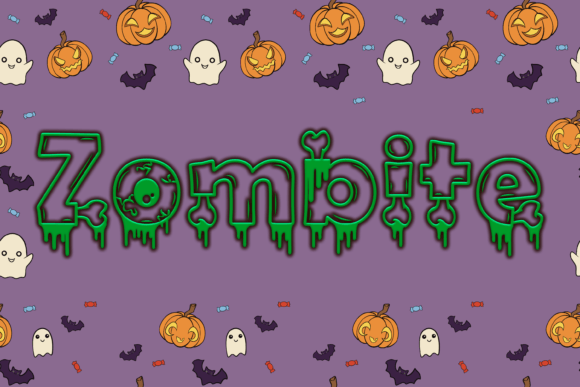
If you're looking to add a touch of eerie charm to your next design, Zombite might just be the font you need. With its jagged edges and hauntingly fun aesthetic, this display font brings a unique creepy vibe that’s perfect for Halloween-themed content or any horror-inspired project. Whether you’re designing posters, social media graphics, or website headers, Zombite can make your text pop with an unforgettable sense of spookiness.
What Makes Zombite Unique?
Zombite stands out due to its bold, irregular shapes and playful distortions. Unlike more traditional fonts that aim for readability and formality, Zombite embraces chaos and character. Each letter feels like it's been gnawed on by something undead yet oddly stylish. This makes it ideal for use in short bursts rather than long paragraphs, where its personality can shine without overwhelming the reader.
The font is handcrafted to evoke the spirit of classic horror aesthetics while maintaining a modern twist. It combines the grotesque appeal of zombie imagery with the whimsy of a well-designed typographic piece. The result is a font that’s both intimidating and approachable — a rare balance that opens up a wide range of creative applications.
Creative Uses for Zombite
Here are some practical ways to incorporate Zombite into your work:
- Halloween Event Posters: Use Zombite as the headline for haunted house promotions, pumpkin patch announcements, or costume contest flyers. Its spooky style instantly grabs attention and sets the right tone.
- Branding for Horror-Themed Businesses: If you run a horror-themed t-shirt brand, a themed café, or even a Halloween party rental service, Zombite could become a signature part of your visual identity.
- Social Media Graphics: Create eye-catching posts for Instagram, Facebook, or TikTok using Zombite to highlight titles, quotes, or hashtags related to Halloween or horror movies.
- Book Covers and Titles: Authors writing horror fiction or mystery novels can benefit from using Zombite to craft a memorable title that reflects the story’s atmosphere.
- Website Headers and Buttons: For sites targeting niche audiences — such as horror movie collectors, Halloween enthusiasts, or themed event planners — Zombite adds a dramatic flair to key elements like navigation menus or call-to-action buttons.
Real-World Inspiration with Zombite
Imagine launching a limited-time Halloween collection for your boutique. Instead of using a generic sans-serif or serif typeface, you pair Zombite with a dark background and glowing neon accents. Suddenly, your branding feels more immersive and thematically aligned with the season.
Or think about a blogger who runs a site dedicated to retro horror films. Using Zombite for section headers and article titles could help create a nostalgic, cinematic look that resonates with fans of classic horror. Pairing it with vintage textures or sepia-toned photos enhances the overall effect.
For educators planning a school Halloween activity or themed classroom decoration, Zombite can be used in signs, certificates, or even scavenger hunt clues. It adds an element of fun while keeping the theme cohesive and engaging for students.
How to Style Zombite Effectively
While Zombite is inherently bold and expressive, how you use it matters just as much as the font itself. Here are some tips to ensure your designs remain clear and impactful:
- Pair with Simpler Fonts: Because Zombite is a display font, it works best when paired with a clean, readable typeface for body text. Think of using it only for headlines, titles, or decorative elements so the rest of your content remains easy to read.
- Use Color Thoughtfully: Zombite looks great in black and white but can also take on a whole new life with color treatments. Try pairing it with deep reds, greens, or purples to enhance its spooky vibe. Neon effects or subtle shadows can also add depth and drama.
- Limit Usage: Don’t overuse Zombite in one design. Too much of it can confuse readers or dilute the visual impact. Reserve it for moments where you want to create a strong emotional response — like a tagline or featured quote.
- Experiment with Layout: Break away from standard alignment rules. Centered, diagonal, or overlapping text can give your designs a more chaotic, horror-movie feel. Just make sure the message is still legible and accessible.
Who Can Benefit from Using Zombite?
Zombite is versatile enough to suit a variety of professionals and hobbyists. Let’s break down how different users can get the most out of it:
- Designers: Incorporate Zombite into mockups for clients in entertainment, retail, or seasonal marketing. It adds instant visual interest and thematic consistency to horror-related concepts.
- Marketers: Use it for promotional materials around October or during holiday events. It can help differentiate your brand in crowded markets by giving your campaigns a distinct, memorable look.
- Bloggers and Content Creators: Add a little edge to your blog headers or YouTube thumbnails. It helps set expectations and draws in viewers who love the horror genre.
- Entrepreneurs: If you're selling themed products like mugs, apparel, or accessories, Zombite can elevate your packaging and labels, making your items stand out at pop-up shops or online stores.
- Freelancers and Publishers: When working on projects for horror anthologies, zines, or themed magazines, Zombite offers a stylistic choice that aligns with the creative vision.
Maintaining Clarity While Embracing Creativity
One challenge with display fonts like Zombite is ensuring they don’t compromise readability. To avoid this, consider the following strategies:
- Stick to uppercase letters for maximum clarity and impact.
- Avoid using too many special characters or ligatures unless they serve a specific purpose.
- Test how the font appears across devices and screen sizes — especially if it will be used online.
- Ensure there's sufficient contrast between the text and background to maintain legibility.
By being intentional with your use of Zombite, you can harness its creative energy without sacrificing usability. This balance is essential for professional-looking designs that communicate effectively.
Where to Find and Use Zombite
Zombite is typically available through digital font marketplaces like Adobe Fonts, Google Fonts, or independent platforms such as Creative Market and Envato Elements. Before downloading, check the licensing terms to ensure it fits your intended usage — whether personal or commercial.
Once you’ve added Zombite to your toolkit, you can begin experimenting in design software like Adobe Photoshop, Illustrator, Figma, or Canva. These tools allow you to adjust spacing, apply effects, and fine-tune the layout to match your project’s needs.
For web designers, embedding Zombite requires linking to the font via CSS. Be mindful of load times and accessibility settings, particularly if you're using it on a high-traffic site. Always provide a fallback font option for users who may not have access to it.
Practical Tips for Getting Started
Here are a few quick recommendations for those new to using Zombite:
- Start small — test it on one headline before applying it throughout a full project.
- Try layering it with textures like torn paper, blood splatters, or fog effects for extra dimension.
- Don’t forget to balance the spooky with the practical; keep supporting text simple and scannable.
- Consider using it in logos or mascots for brands that want to embrace a bold, unconventional style.
Final Thoughts on Zombite
Zombite isn't just another Halloween font — it's a tool for storytelling through typography. When used thoughtfully, it can transform ordinary designs into something memorable and immersive. Whether you're a seasoned designer or someone exploring their creative side, this font offers a fresh way to engage audiences with a touch of the macabre.
So go ahead — let Zombite bring some fun frights to your next project. You’ll be surprised how much it can elevate your message and visuals when you lean into its unique character. Remember, the goal is to spark creativity, not confusion. Keep your designs organized, consistent, and audience-focused, and Zombite will do the rest.